Every certificate on the machine, and what will stop working when
v0.1.1certificatesMIT
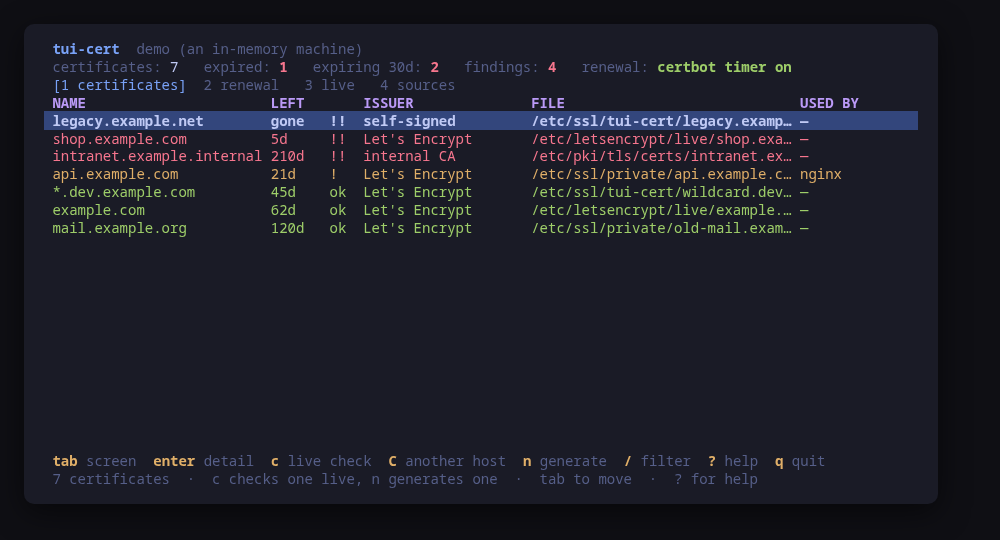
The inventory, worst first: what expires when, who issued it, and which server serves it
A terminal UI for the TLS certificates on this machine. It finds them — the Let's Encrypt tree, /etc/ssl, /etc/pki, the paths an nginx, Apache or Caddy configuration names — and puts them on one screen, worst first: expired, expiring, the ones whose private key is not their key, the ones whose key every account can read.
Reading is done in Go. crypto/x509 parses the chain, verifies it against the system trust store and compares the key, so the whole inventory works on a machine with no openssl, no certbot and nothing else installed. Those are optional and only ever used to act.
Three more screens complete it: what certbot or acme.sh manages and whether its renewal timer is really running; a live TLS handshake, on demand, which is how a certificate renewed on disk and never reloaded shows itself; and where the tool looked, including what it could not open.
Every change is previewed as the exact command line: a rehearsed renewal, a forced one with what it costs in rate limit, or a generated key pair.
Run tui-cert --demo for a sample machine with seven certificates in seven states, and nothing touched.
Keys
Key
Action
tab / 1-4
Move between certificates, renewal, live checks and sources
enter
Open the selected row in full
c
Connect to the selected certificate's own name and read what is served
C
The same, against a host you type
n
Generate a self-signed certificate, previewed before it is written
s
Generate a certificate signing request the same way
d
Rehearse every renewal against the staging authority, writing nothing
F
Force the selected certificate to renew now, rate limit and all
/
Filter the rows of the current screen
R
Re-read this machine
?
Help
q
Quit
Press ? inside the tool for the full help screen, which is generated from the same action table as the key map.
Compatibility
This tool is a face on the program below, so its version matters.Tested is not a claim: a version lands there only after the tool's own suite passed against it on a real machine in the lab, and the run is kept as evidence in the repository. At startup the tool probes the backend once and says what it found in its header — a version nobody has run against is shown as(untested) in the warning colour, one older than the minimum as (below minimum) in the error colour. Neither stops it: the backend still refuses what it cannot do, in its own words.
certbot
certbot ≥ 1.0
Binary
certbot
Minimum
1.0
Probed with
certbot --version
Tested
No recorded run yet. The tool still runs and reports the version it found as untested.
What changes on older versions
certbot >=1.0
certbot is optional: without it the inventory, the chain validation, the key match and the live check all still work, and only the renewal screen's two keys say there is nothing here to renew with
certbot <2.0
a certificate renewed by this certbot keeps the RSA key type it was issued with; from 2.0 the default became ECDSA, so a renewal there can change the key type of a certificate a client was pinned to
acme-sh
acme.sh ≥ 3.0.0
Binary
acme.sh
Minimum
3.0.0
Probed with
acme.sh --version
Tested
No recorded run yet. The tool still runs and reports the version it found as untested.
What changes on older versions
acme-sh >=3.0.0
acme.sh renews from a crontab entry rather than a systemd timer, and tui-cert reads nobody's crontab: the renewal screen says so instead of claiming nothing is scheduled
openssl
openssl ≥ 1.1.1
Binary
openssl
Minimum
1.1.1
Probed with
openssl version
Tested
3.0.133.5.53.6.4
Needs a version this new
addextsince 1.1.1
What changes on older versions
openssl <1.1.1
openssl req has no -addext, so a subject alternative name cannot be set on the command line; tui-cert will not write an openssl configuration file, so the generate keys say why they are unavailable rather than producing a certificate no client accepts
openssl >=1.1.1
openssl is only ever used to generate a key pair; nothing is read with it, so a machine without it loses two keys and keeps every screen
Install
Once per machine, then every tool in the family is one pacman away.
Add the repository
$ curl -fsSL https://pkgs.tui.tools/install.sh | sh
Or run the same thing yourself, one command at a time
A family whose whole promise is preview before you run is not going to insist you pipe a script into a shell. These are the commands that script runs.
Upgrades then arrive with the rest of your system updates.
!
Not published yet. The command is what it will be once the package repository at pkgs.tui.tools is live. Until then, use the static binary or build from source.
Arch Linux (AUR) · tui-cert-bincoming soon
$ paru -S tui-cert-bin
The -bin package installs the released static binary.
Once per machine, then every tool in the family is one apt away.
Add the repository
$ curl -fsSL https://pkgs.tui.tools/install.sh | sh
Or run the same thing yourself, one command at a time
A family whose whole promise is preview before you run is not going to insist you pipe a script into a shell. These are the commands that script runs.
Upgrades then arrive with the rest of your system updates.
!
Not published yet. The command is what it will be once the package repository at pkgs.tui.tools is live. Until then, use the static binary or build from source.
Needs the tui-tools repository, a one-time setup you do once per machine.
openSUSE · tui-certcoming soon
$ sudo zypper install tui-cert
The rpm repository is shared with dnf; zypper support is not tested yet.
One static binary. Verify it against checksums.txt from the same release.
From source · tui-cert
$ git clone https://github.com/tui-tools/tui-cert
  cd tui-cert && make build
  sudo install -m0755 bin/tui-cert /usr/local/bin/tui-cert
Needs Go 1.27 or newer.
What it can do to your machine
✓
Preview, then confirm
Every change is shown as an exact command line and confirmed before it runs. The dialog and the runner receive the same value, so the preview cannot drift from what executes.
•
Escalates for actions
Three reads escalate through sudo -n, which never prompts: ls, stat and cat, for the certificate directories an ordinary user cannot open — /etc/letsencrypt and /etc/ssl/private on every distribution. A private key is never read through sudo. Renewing and generating escalate too.
✓
No daemon, no state of its own
Nothing keeps running after you quit, and nothing is installed to run later. The system is the source of truth; the tool re-reads it after every change.
✕
Opens network connections
One TLS handshake to a host:port you type, and only when you press c. Nothing is sent over it and the socket is closed as soon as the certificate is read. Starting the tool, and --check, open no connection at all.
✓
Static binary
Released statically linked, with no runtime dependencies to install.
✕
Releases are not signed yet
Releases carry SHA-256 checksums but no signature. Verify the checksum, and read this as the open item it is.
Reporting
Report a security issue privately, through GitHub's private vulnerability reporting on the repository's Security tab. The family-wide policy, and what counts as in scope, is on the security page.
## Changelog
* cd78c648f4ba2c5e7772216814b46faa3789d860 Assert the absent-ACME-client path, which is the one every guest runs
* c9837fea12567e0d7f7af1c94210ec4cc7b1db84 Packages are available from pkgs.tui.tools
* 07538e2325669738c68c398a7298604a987ca4c7 Re-pin the kit at v0.2.3
* 1a4b12373fac9fc53d350e72ef52d9e63b11153a Ship the tool as a .deb, an .rpm and a pacman package