The machine's security posture, with the command behind every verdict
v0.1.0securityMIT
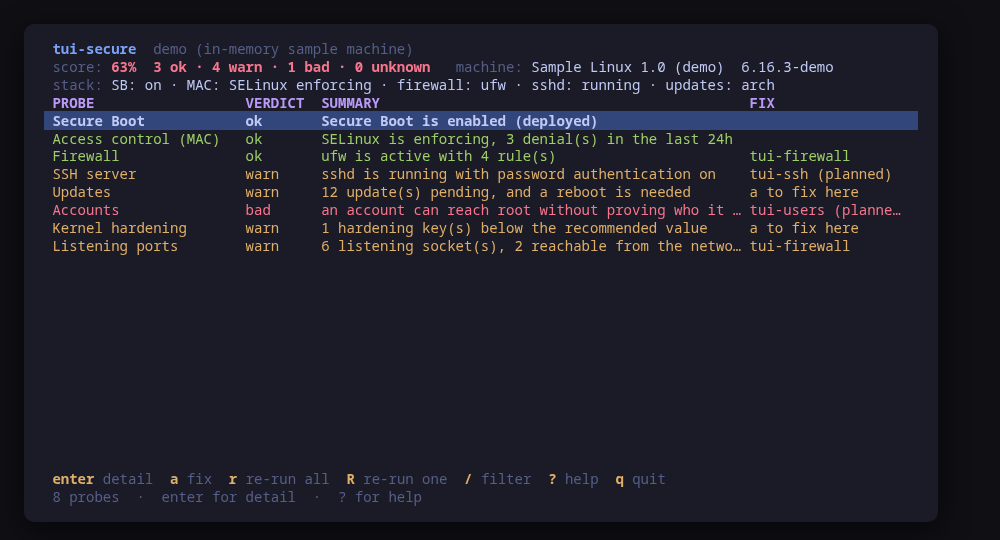
The posture: one row per probe, its verdict, and the score across all of them
A terminal UI for the security posture of one Linux machine. Eight probes — Secure Boot, the MAC layer, the firewall, sshd, pending updates, accounts, kernel hardening and listening ports — each answered ok, warn, bad or unknown, with a score across the lot.
Every verdict shows its work. Open a probe and you get the exact command that was run, the line it judged, the full raw output underneath, and a fix that names either the sibling tool that owns the change (tui-firewall, tui-update) or the command to run yourself.
It reads first and asks second. Nothing escalates beyond sudo -n, which never prompts, so a probe that needs root it cannot get degrades to unknown with the reason instead of hanging on a password. Three fixes are offered inline — enabling ufw, setting one kernel hardening key with its drop-in, enabling the update timer — and each is previewed as the exact command line and confirmed first.
Run tui-secure --demo to drive a sample machine: every key works, every command is built and previewed for real, and nothing touches your system.
Keys
Key
Action
enter
Open the probe: evidence, raw output and the fix
a
Apply an offered fix, previewed and confirmed first
r
Re-run every probe
R
Re-run the selected probe
/
Filter the probes by name, verdict or summary
?
Help
q
Quit
Press ? inside the tool for the full help screen, which is generated from the same action table as the key map.
Compatibility
This tool is a face on the program below, so its version matters.Tested is not a claim: a version lands there only after the tool's own suite passed against it on a real machine in the lab, and the run is kept as evidence in the repository. At startup the tool probes the backend once and says what it found in its header — a version nobody has run against is shown as(untested) in the warning colour, one older than the minimum as (below minimum) in the error colour. Neither stops it: the backend still refuses what it cannot do, in its own words.
systemd
systemctl ≥ 245
Binary
systemctl
Minimum
245
Probed with
systemctl --version
Tested
255257259261
Needs a version this new
journal-grepsince 246
What changes on older versions
systemd <246
journalctl --grep does not exist, so the denial and failed-login counts are read by filtering the journal here instead of in journalctl, which is slower on a large journal
openssh
sshd ≥ 8.2
Binary
sshd
Minimum
8.2
Probed with
ssh -V
Tested
9.69.910.210.5
Needs a version this new
sshd-test-configsince 8.2
What changes on older versions
openssh <8.2
sshd -T predates several of the keywords this probe reads, so the settings come from parsing sshd_config and its drop-ins instead, which does not resolve Match blocks
ufw
ufw ≥ 0.36
Binary
ufw
Minimum
0.36
Probed with
ufw --version
Tested
0.36.2
What changes on older versions
ufw <0.36
ufw status verbose prints no default policy line, so the incoming and outgoing policies are reported as unknown and only the active state is judged
firewalld
firewall-cmd ≥ 0.9
Binary
firewall-cmd
Minimum
0.9
Probed with
firewall-cmd --version
Tested
2.3.22.4.4
sbctl
Binary
sbctl
Probed with
sbctl version
Tested
No recorded run yet. The tool still runs and reports the version it found as untested.
What changes on older versions
sbctl >=0.1
sbctl is optional: without it the Secure Boot probe reports what bootctl status knows and says nothing about enrolled keys or signed files
Install
Once per machine, then every tool in the family is one pacman away.
Add the repository
$ curl -fsSL https://pkgs.tui.tools/install.sh | sh
Or run the same thing yourself, one command at a time
A family whose whole promise is preview before you run is not going to insist you pipe a script into a shell. These are the commands that script runs.
Upgrades then arrive with the rest of your system updates.
!
Not published yet. The command is what it will be once the package repository at pkgs.tui.tools is live. Until then, use the static binary or build from source.
Arch Linux (AUR) · tui-secure-bincoming soon
$ paru -S tui-secure-bin
The -bin package installs the released static binary.
Once per machine, then every tool in the family is one apt away.
Add the repository
$ curl -fsSL https://pkgs.tui.tools/install.sh | sh
Or run the same thing yourself, one command at a time
A family whose whole promise is preview before you run is not going to insist you pipe a script into a shell. These are the commands that script runs.
Upgrades then arrive with the rest of your system updates.
!
Not published yet. The command is what it will be once the package repository at pkgs.tui.tools is live. Until then, use the static binary or build from source.
Needs the tui-tools repository, a one-time setup you do once per machine.
openSUSE · tui-securecoming soon
$ sudo zypper install tui-secure
The rpm repository is shared with dnf; zypper support is not tested yet.
One static binary. Verify it against checksums.txt from the same release.
From source · tui-secure
$ git clone https://github.com/tui-tools/tui-secure
  cd tui-secure && make build
  sudo install -m0755 bin/tui-secure /usr/local/bin/tui-secure
Needs Go 1.27 or newer.
What it can do to your machine
✓
Preview, then confirm
Every change is shown as an exact command line and confirmed before it runs. The dialog and the runner receive the same value, so the preview cannot drift from what executes.
•
Escalates for actions
Most probes read unprivileged. Escalation is sudo -n, which never prompts: it covers the reads only root can do (ufw status, sshd -T, /etc/shadow, sudo -l, the nftables ruleset) and the three offered fixes. A probe that cannot escalate reports unknown with the reason.
✓
No daemon, no state of its own
Nothing keeps running after you quit, and nothing is installed to run later. The system is the source of truth; the tool re-reads it after every change.
✕
Opens network connections
The update probe runs the distribution's own update check (checkupdates, apt-get -s upgrade, dnf check-update), which contacts the configured package repositories. tui-secure itself opens no connection.
✓
Static binary
Released statically linked, with no runtime dependencies to install.
✕
Releases are not signed yet
Releases carry SHA-256 checksums but no signature. Verify the checksum, and read this as the open item it is.
Reporting
Report a security issue privately, through GitHub's private vulnerability reporting on the repository's Security tab. The family-wide policy, and what counts as in scope, is on the security page.
## Changelog
* 5dc90ba63ada888548d488933f2a156290368403 Give it a face: the branding, six frames and the README
* c88b946d7742b36472d82684d08e29c36b8a4117 Initial commit
* ba9c696b4571b6f1d361b32ff47bb01fc10130ca Point the install line at v0.1.0
* aac2efff07610fc50ec9b580163f67e9dd524803 Prove it against a real machine, and record which one
* 95ec8cf975f35dff981e890546967345579d41a8 Read the machine's posture: the model, the backend and its probes
* 1e2288fb487f499f895d7e66a01c376cbecafb83 Start tui-secure from the family template
* 970ac953a060e0e4752f796b52322e06e0fa7f73 The screens: the posture, one probe in full, and one confirm dialog