Pending package updates, what they restart, and a snapshot first
v0.1.1packagesMIT
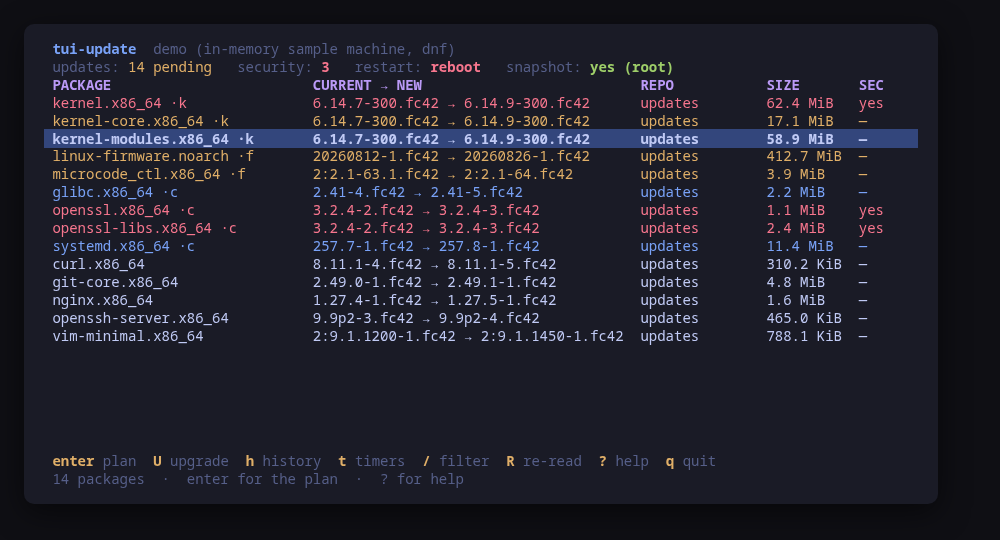
The pending list: current to new, repository, size and the security flag, kernel and firmware first
A terminal UI for the updates waiting on your machine. It reads them from whichever package manager the machine actually runs — pacman, apt or dnf — and shows what a list of versions never tells you: what applying them will cost.
Every pending update is on one screen, with its current and new version, its repository, its size and its security flag where the manager publishes one, and the kernel and firmware sorted to the top because they are what turns an upgrade into a reboot.
enter gives you the plan: the manager's own dry run, the restart classification — nothing, the services still holding replaced code open, or a reboot with the reason — whether a snapper snapshot can be taken first and the exact command that would take it, and the whole sequence, in order, before anything runs.
U applies it behind a confirm dialog carrying that sequence, streaming the output as it goes. It never reboots by itself: when the upgrade needs one it offers R, with its own confirmation.
Run tui-update --demo to drive a sample machine: every key works, every command is built and previewed for real, and nothing touches your system.
Keys
Key
Action
enter / p
Plan: what applying the updates would do
U
Apply the plan, after confirming the whole sequence
m
On apt, switch between upgrade and dist-upgrade
h
The package manager's own transaction history
t
The unattended-update timers, with enable and disable
e / d
On the timers screen: enable or disable the unit
R
Re-read; on a finished upgrade, offer the reboot
/
Filter the packages across every column
?
Help
q
Quit
Press ? inside the tool for the full help screen, which is generated from the same action table as the key map.
Compatibility
This tool is a face on the program below, so its version matters.Tested is not a claim: a version lands there only after the tool's own suite passed against it on a real machine in the lab, and the run is kept as evidence in the repository. At startup the tool probes the backend once and says what it found in its header — a version nobody has run against is shown as(untested) in the warning colour, one older than the minimum as (below minimum) in the error colour. Neither stops it: the backend still refuses what it cannot do, in its own words.
pacman
pacman ≥ 6.0
Binary
pacman
Minimum
6.0
Probed with
pacman --version
Tested
7.1.0
What changes on older versions
pacman >=6.0
pacman publishes no security metadata, so no update is ever marked as a security fix here; the column reads n/a rather than no
pacman >=6.0
there is no dry run that does not first synchronise the databases, which needs root, so the plan quotes the pending list instead of a simulated transaction
pacman >=6.0
checkupdates needs pacman-contrib *and* fakeroot, since it builds its private copy of the sync database under it; without either the pending list falls back to pacman -Qu, which is whatever the last pacman -Sy left on disk, and the screen says so
pacman >=6.0
on Omarchy Server the upgrade runs through omarchy-server-update run --no-reboot, and omarchy-server-update-restart --dry-run is what classifies the restarts; on plain Arch there is no classifier and the package names decide
apt
apt ≥ 2.0
Binary
apt
Minimum
2.0
Probed with
apt --version
Tested
2.8.3
Needs a version this new
solver3since 2.9.3
What changes on older versions
apt >=2.0
a security update is one whose pocket ends in -security; apt publishes no advisory id, so that pocket name is the whole reference
apt >=2.0
neither apt list --upgradable nor apt-get -s upgrade reports a per-package size, so the size column is not shown; the plan carries apt's own download and disk totals instead
apt >=2.0
the services to restart come from needrestart -b, which reads other processes' memory maps and therefore needs root; without it the package names decide
dnf
dnf ≥ 4.0
Binary
dnf
Minimum
4.0
Probed with
dnf --version
Tested
5.2.185.4.1
Needs a version this new
dnf5since 5.0
What changes on older versions
dnf >=5.0
dnf --version prints dnf5 version 5.2.18.0, where dnf4 prints a bare 4.24.0 on its first line; both are read by the same pattern, which keeps three components because a four-part version is not one the family schema records
dnf >=5.0
dnf needs-restarting refreshes the repository metadata before answering, which a read path must not do, so the standalone needs-restarting binary from dnf-plugins-core is used instead and its absence falls back to the package names
dnf >=4.0
dnf check-update exits 100 when there are updates, so its exit code is interpreted rather than treated as a failure; it also prints only the new version, and the installed one is read from rpm
Install
Once per machine, then every tool in the family is one pacman away.
Add the repository
$ curl -fsSL https://pkgs.tui.tools/install.sh | sh
Or run the same thing yourself, one command at a time
A family whose whole promise is preview before you run is not going to insist you pipe a script into a shell. These are the commands that script runs.
Upgrades then arrive with the rest of your system updates.
!
Not published yet. The command is what it will be once the package repository at pkgs.tui.tools is live. Until then, use the static binary or build from source.
Arch Linux (AUR) · tui-update-bincoming soon
$ paru -S tui-update-bin
The -bin package installs the released static binary.
Once per machine, then every tool in the family is one apt away.
Add the repository
$ curl -fsSL https://pkgs.tui.tools/install.sh | sh
Or run the same thing yourself, one command at a time
A family whose whole promise is preview before you run is not going to insist you pipe a script into a shell. These are the commands that script runs.
Upgrades then arrive with the rest of your system updates.
!
Not published yet. The command is what it will be once the package repository at pkgs.tui.tools is live. Until then, use the static binary or build from source.
Needs the tui-tools repository, a one-time setup you do once per machine.
openSUSE · tui-updatecoming soon
$ sudo zypper install tui-update
The rpm repository is shared with dnf; zypper support is not tested yet.
One static binary. Verify it against checksums.txt from the same release.
From source · tui-update
$ git clone https://github.com/tui-tools/tui-update
  cd tui-update && make build
  sudo install -m0755 bin/tui-update /usr/local/bin/tui-update
Needs Go 1.27 or newer.
What it can do to your machine
✓
Preview, then confirm
Every change is shown as an exact command line and confirmed before it runs. The dialog and the runner receive the same value, so the preview cannot drift from what executes.
•
Escalates for actions
Reads are unprivileged and never refresh the manager's metadata: checkupdates, apt list --upgradable, dnf check-update and rpm -q all answer to any user from what is on disk. Escalation is sudo -n, which never prompts, and covers the restart classifiers plus every change.
✓
No daemon, no state of its own
Nothing keeps running after you quit, and nothing is installed to run later. The system is the source of truth; the tool re-reads it after every change.
✓
No network access
The tool opens no network connection of its own. No telemetry, no update check, no phone home.
✓
Static binary
Released statically linked, with no runtime dependencies to install.
✕
Releases are not signed yet
Releases carry SHA-256 checksums but no signature. Verify the checksum, and read this as the open item it is.
Reporting
Report a security issue privately, through GitHub's private vulnerability reporting on the repository's Security tab. The family-wide policy, and what counts as in scope, is on the security page.
## Changelog
* 6e872cc9b7abad19ddb1c868899e70d58f3b81df Packages are available from pkgs.tui.tools
* 250cde4e769a6120d4907b5aa6ef944267140bf5 Re-pin the kit at v0.2.3
* d9c3ed1e2a9654203aa7fe29a022bf9f4782066d Read the pending list on a machine checkupdates cannot run on
* 043fce7b7933b4c59931515c9c0fc8becc780d07 Read the version banners from the captured fixtures
* 43d2b76c3bc5d3e0d8a1fe004e9763af1eeebee4 Ship the tool as a .deb, an .rpm and a pacman package
* 4f49f0f222f37e2be5cd8f81e29e35f60449ea96 Show the apply screen the README was missing