Samba shares, accounts and live connections, with every change previewed
v0.1.1file-sharingMIT
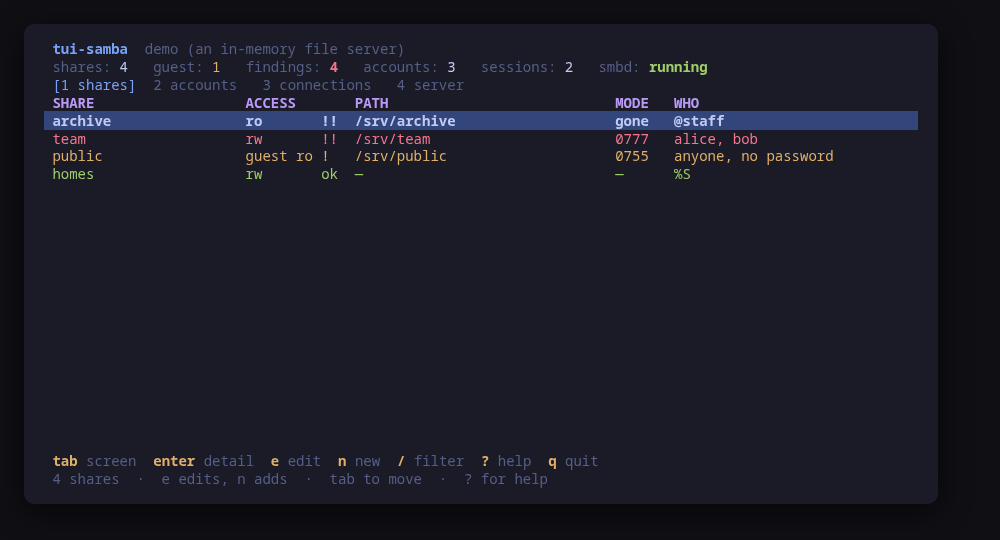
Every share on one list, worst first: what it exports, who may reach it, and the Unix mode of the directory behind it
A terminal UI for a Samba file server: the shares it exports, the accounts that can reach them, and who is connected right now.
The shares are listed worst first. A path that does not exist, a directory somebody left at mode 0777, a writable share open to guests — each one is a sentence on the row rather than something to work out from testparm output and a stat. The configuration comes from testparm -s, which is what the server resolved rather than what anybody typed, and every share carries the Unix permissions, the owner and the SELinux label of the directory behind it.
A change goes through Samba's own parser before it goes anywhere near /etc. A share is edited in a guided form, staged to a file, read back with testparm -s and shown as a diff — and only then confirmed. It is installed with install -m 644 and picked up with smbcontrol all reload-config, which disconnects nobody.
This is a file server tool. Samba as an Active Directory domain controller is deliberately out of scope.
Run tui-samba --demo to drive a sample server: every key works, every command is built and previewed for real, and nothing touches your system.
Keys
Key
Action
tab / 1-4
Move between the shares, the accounts, the live connections and the server itself
enter
Open the selected row in full
e
Edit the selected share, checked by testparm and shown as a diff first
n
Add a share, written to a drop-in of its own
a
Add a Samba account, its password read from standard input
p
Set the selected account's password
E / D
Enable or disable the selected account
x
Remove the selected account from the Samba database, leaving the Unix one
r
Tell the running server to re-read its configuration
t
Ask the server what an anonymous client on the network sees
/
Filter the rows of the current screen
?
Help
q
Quit
Press ? inside the tool for the full help screen, which is generated from the same action table as the key map.
Compatibility
This tool is a face on the program below, so its version matters.Tested is not a claim: a version lands there only after the tool's own suite passed against it on a real machine in the lab, and the run is kept as evidence in the repository. At startup the tool probes the backend once and says what it found in its header — a version nobody has run against is shown as(untested) in the warning colour, one older than the minimum as (below minimum) in the error colour. Neither stops it: the backend still refuses what it cannot do, in its own words.
samba
smbd ≥ 4.11
Binary
smbd
Minimum
4.11
Probed with
smbd --version
Tested
4.24.6
Needs a version this new
status-jsonsince 4.17
What changes on older versions
samba <4.17
smbstatus --json does not exist, so the connections are read from the text output; the sessions, the shares in use and the open files are all there, and the per-session encryption is whatever those columns carry
samba >=4.17
smbstatus --json is used, so a session's dialect, signing and encryption come from Samba's own document instead of from columns separated by runs of spaces a value may also contain
samba >=4.11
SMB1 is off by default from this release, so a server min protocol below SMB2 is something somebody set on purpose — which is why tui-samba raises it and says nothing about a server on the default
samba >=4.11
testparm --show-all-parameters is not used at all: it prints every parameter Samba has rather than this server's, so the effective configuration comes from testparm -s
samba >=4.11
a machine may have no Samba at all, and that is a normal machine rather than a failure: the tool says so on its first screen and --check reports it as "installed": false and exits 0
Install
Once per machine, then every tool in the family is one pacman away.
Add the repository
$ curl -fsSL https://pkgs.tui.tools/install.sh | sh
Or run the same thing yourself, one command at a time
A family whose whole promise is preview before you run is not going to insist you pipe a script into a shell. These are the commands that script runs.
Upgrades then arrive with the rest of your system updates.
!
Not published yet. The command is what it will be once the package repository at pkgs.tui.tools is live. Until then, use the static binary or build from source.
Arch Linux (AUR) · tui-samba-bincoming soon
$ paru -S tui-samba-bin
The -bin package installs the released static binary.
Once per machine, then every tool in the family is one apt away.
Add the repository
$ curl -fsSL https://pkgs.tui.tools/install.sh | sh
Or run the same thing yourself, one command at a time
A family whose whole promise is preview before you run is not going to insist you pipe a script into a shell. These are the commands that script runs.
Upgrades then arrive with the rest of your system updates.
!
Not published yet. The command is what it will be once the package repository at pkgs.tui.tools is live. Until then, use the static binary or build from source.
Needs the tui-tools repository, a one-time setup you do once per machine.
openSUSE · tui-sambacoming soon
$ sudo zypper install tui-samba
The rpm repository is shared with dnf; zypper support is not tested yet.
One static binary. Verify it against checksums.txt from the same release.
From source · tui-samba
$ git clone https://github.com/tui-tools/tui-samba
  cd tui-samba && make build
  sudo install -m0755 bin/tui-samba /usr/local/bin/tui-samba
Needs Go 1.27 or newer.
What it can do to your machine
✓
Preview, then confirm
Every change is shown as an exact command line and confirmed before it runs. The dialog and the runner receive the same value, so the preview cannot drift from what executes.
•
Escalates for actions
Reading the configuration usually needs nothing: smb.conf is world-readable. The password database and smbstatus are root-only, and every change escalates through sudo -n, which never prompts: writing a share, reloading the server, and every smbpasswd call.
✓
No daemon, no state of its own
Nothing keeps running after you quit, and nothing is installed to run later. The system is the source of truth; the tool re-reads it after every change.
✕
Opens network connections
One key runs smbclient -L localhost -N, which opens a connection to this machine's own SMB port to read the share list an anonymous client is shown. It is previewed and confirmed like every other command, and sends no password. Nothing else here opens a socket.
✓
Static binary
Released statically linked, with no runtime dependencies to install.
✕
Releases are not signed yet
Releases carry SHA-256 checksums but no signature. Verify the checksum, and read this as the open item it is.
Reporting
Report a security issue privately, through GitHub's private vulnerability reporting on the repository's Security tab. The family-wide policy, and what counts as in scope, is on the security page.
## Changelog
* 2bda73b1ef0ef239a3589bca04e62314e3c14567 Packages are available from pkgs.tui.tools
* bb3f861963571e43390c955c7b54c1fd471c7e8a Re-pin the kit at v0.2.3
* 3a1da992528511c99ce5dfc030a6db7a9d212d60 Record Samba 4.24.6 from a machine that really runs it
* d3f323ecaee9f3cda24a84915d3b24cc7a8cef03 Ship the tool as a .deb, an .rpm and a pacman package
## Changelog
* c8ae2e409f1b75bf402de49367340851387c4fbf Fit the help panel on a 26 row terminal
* 60040d0fc123821997731f9cf8baa2ee28a5408a Initial commit
* d70e4f28473af38279809843a8f4a2239a88e51b Turn the template into tui-samba