Accounts, groups, keys and sudo, with every change previewed before it runs
v0.1.1usersMIT
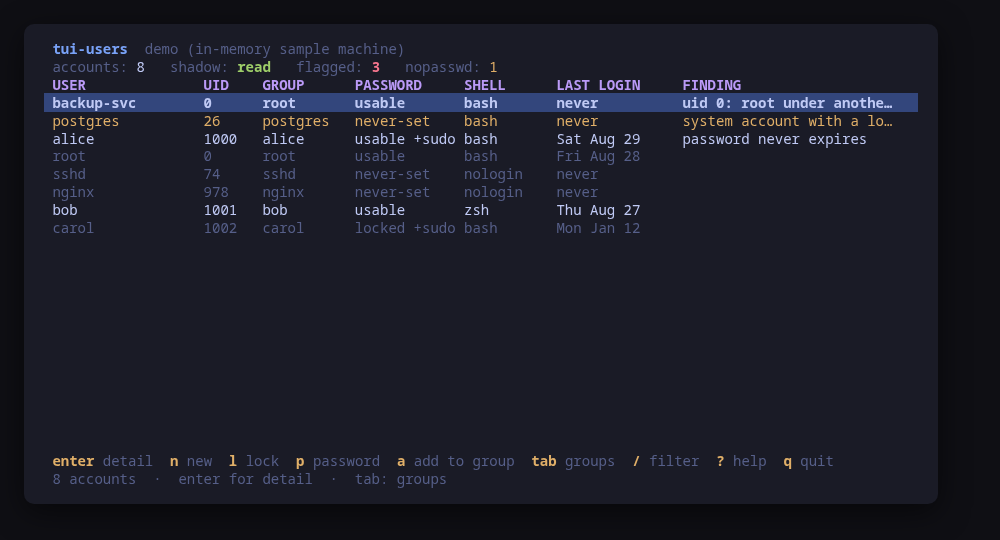
The accounts table, findings first: uid 0 twice, an empty password, a service account with a shell
A terminal UI for the machine's local accounts. It lists every account with the facts that decide what it can do — uid, primary group, groups, shell, last login, whether the password is usable, locked or missing — and puts the ones worth a second look at the top, with the reason: a second account with uid 0, an empty password, a service account with a login shell.
Open an account and you get the whole picture: its aging policy in words rather than in days-since-1970, the authorized keys in its ~/.ssh with their fingerprints, what sudo says it may run, and its open sessions. A second screen lists the groups with their real membership, primary members included; a third quotes every rule in /etc/sudoers and /etc/sudoers.d, marking the ones that run without a password.
Changes are previewed: creating an account, deleting it, locking it, setting a password, editing group membership, changing the shell, setting an expiry, adding or removing an authorized key. A password never reaches a command line — it goes to chpasswd on standard input.
Run tui-users --demo to drive a sample machine: every key works and nothing touches your system.
Keys
Key
Action
enter
Open the selected account or group
tab
Move between accounts, groups and sudo rules
n / D
Create an account / delete one, with or without its home
l
Lock or unlock the account's password
p
Set a password, never echoed and never in a command line
a / x
Add the account to a group / remove it from one
s
Change the login shell
e
Set the account expiry and the password lifetime
K
Add an authorized key, or remove one, with a diff to confirm
/
Filter the screen across every column
?
Help
q
Quit
Press ? inside the tool for the full help screen, which is generated from the same action table as the key map.
Compatibility
This tool is a face on the program below, so its version matters.Tested is not a claim: a version lands there only after the tool's own suite passed against it on a real machine in the lab, and the run is kept as evidence in the repository. At startup the tool probes the backend once and says what it found in its header — a version nobody has run against is shown as(untested) in the warning colour, one older than the minimum as (below minimum) in the error colour. Neither stops it: the backend still refuses what it cannot do, in its own words.
shadow-utils
useradd ≥ 4.8
Binary
useradd
Minimum
4.8
Tested
No recorded run yet. The tool still runs and reports the version it found as untested.
What changes on older versions
shadow-utils >=4.8
shadow-utils prints no version from any of its programs: useradd --version, chage --version and every sibling answer "unrecognized option" on Arch, Debian and Fedora alike. This backend therefore declares no version command, and the header shows none for it
shadow-utils >=4.8
the minimum above is informative, not enforced: it is the release whose flags this tool uses (useradd -r -m -G, usermod -L -U -s, userdel -r, gpasswd -a -d, chage -E -M -l), all far older than any supported distribution
shadow-utils >=4.8
reading the lock state and the expiry of an account needs getent shadow, which needs root; an unprivileged run lists every account and says the password state is unknown rather than implying it is fine
openssh
ssh-keygen ≥ 8.2
Binary
ssh-keygen
Minimum
8.2
Probed with
ssh -V
Tested
9.610.210.5
Needs a version this new
security-keyssince 8.2
What changes on older versions
openssh <8.2
ssh-keygen -l does not know the sk- key types, so a FIDO security key in an authorized_keys file cannot be fingerprinted and adding one is warned about: sshd would ignore the line it wrote
openssh <6.8
ssh-keygen -l prints MD5 fingerprints rather than SHA256, so the fingerprint column will not match what a modern ssh-keygen -lf shows elsewhere
Install
Once per machine, then every tool in the family is one pacman away.
Add the repository
$ curl -fsSL https://pkgs.tui.tools/install.sh | sh
Or run the same thing yourself, one command at a time
A family whose whole promise is preview before you run is not going to insist you pipe a script into a shell. These are the commands that script runs.
Upgrades then arrive with the rest of your system updates.
!
Not published yet. The command is what it will be once the package repository at pkgs.tui.tools is live. Until then, use the static binary or build from source.
Arch Linux (AUR) · tui-users-bincoming soon
$ paru -S tui-users-bin
The -bin package installs the released static binary.
Once per machine, then every tool in the family is one apt away.
Add the repository
$ curl -fsSL https://pkgs.tui.tools/install.sh | sh
Or run the same thing yourself, one command at a time
A family whose whole promise is preview before you run is not going to insist you pipe a script into a shell. These are the commands that script runs.
Upgrades then arrive with the rest of your system updates.
!
Not published yet. The command is what it will be once the package repository at pkgs.tui.tools is live. Until then, use the static binary or build from source.
Needs the tui-tools repository, a one-time setup you do once per machine.
openSUSE · tui-userscoming soon
$ sudo zypper install tui-users
The rpm repository is shared with dnf; zypper support is not tested yet.
One static binary. Verify it against checksums.txt from the same release.
From source · tui-users
$ git clone https://github.com/tui-tools/tui-users
  cd tui-users && make build
  sudo install -m0755 bin/tui-users /usr/local/bin/tui-users
Needs Go 1.27 or newer.
What it can do to your machine
✓
Preview, then confirm
Every change is shown as an exact command line and confirmed before it runs. The dialog and the runner receive the same value, so the preview cannot drift from what executes.
•
Escalates for actions
Most reads are unprivileged: getent passwd, getent group, lastlog and loginctl answer to any user. sudo -n, which never prompts, covers three reads — /etc/shadow, the sudoers files and another account's chage -l — and every change.
✓
No daemon, no state of its own
Nothing keeps running after you quit, and nothing is installed to run later. The system is the source of truth; the tool re-reads it after every change.
✓
No network access
The tool opens no network connection of its own. No telemetry, no update check, no phone home.
✓
Static binary
Released statically linked, with no runtime dependencies to install.
✕
Releases are not signed yet
Releases carry SHA-256 checksums but no signature. Verify the checksum, and read this as the open item it is.
Reporting
Report a security issue privately, through GitHub's private vulnerability reporting on the repository's Security tab. The family-wide policy, and what counts as in scope, is on the security page.
## Changelog
* 7baf740f811d5b13861f0393ee764df84e4882dd Make the per-account read testable, and fix a smoke test that never could pass
* 5641c827d25e1e6887ee341ebf55d17181a9af9e Packages are available from pkgs.tui.tools
* f9a78957ad0fd46d89226ecd7c6b689a9645b10a Re-pin the kit at v0.2.3
* 2e3df14ec117e69ca89164a8c260dad11f867e7e Ship the tool as a .deb, an .rpm and a pacman package
## Changelog
* 359c5841ab5c9523c15bbbaacaa1eb9a723e5b43 Initial commit
* 941e5197cdcb0638d7dd161f1d63738bf48b07c9 Point the install command at the v0.1.0 release
* 8749568f04d8294e3282137ec168b0446da00818 tui-users v0.1: the machine's accounts, previewed before they change