

tui-tools

tui-logs

The journal on one screen: narrow it, follow it, and shrink it safely

v0.1.1logsMIT
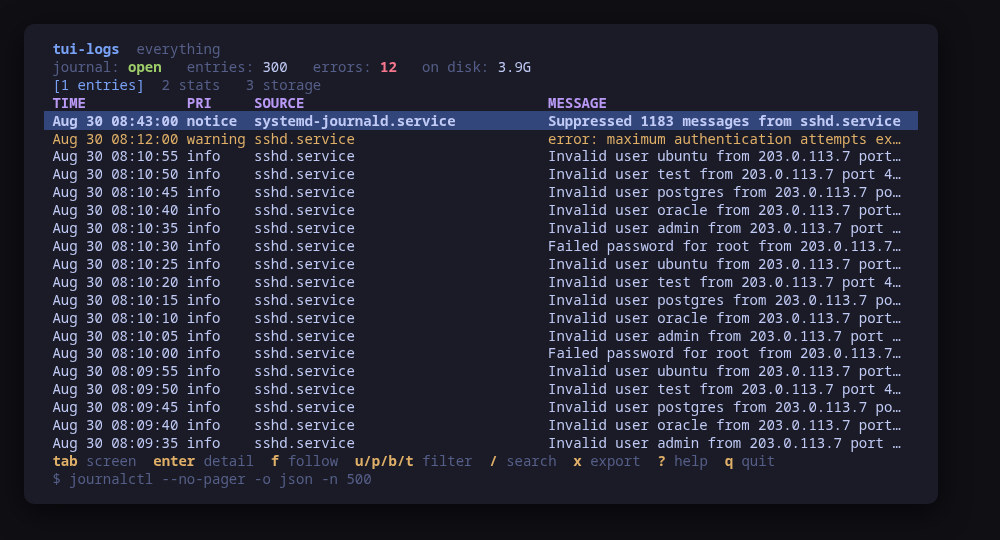
The journal, with the journalctl command behind what is on screen along the bottom

A terminal UI for the systemd journal. Every filter it offers is a journalctl argument — unit, priority, boot, time window, --grep, kernel only, the user journal — and the command line they add up to is on the status bar, so what you are looking at is always something you could have typed.

Press enter on a line and you get the record rather than the sentence: the pid, the uid, the executable and its command line, the source file and line for a program that logs through sd-journal, the MESSAGE_ID with a name for the well-known ones, and every other field the journal happened to carry. There is no clipboard to copy it with, so the screen shows the journalctl --cursor invocation that prints that entry instead.

A second screen counts the window on show: errors, the noisiest units, a sparkline. A third says what the journal costs, whether it survives a reboot, and what journald.conf resolves to.

Housekeeping is four commands, each previewed and confirmed: vacuum by size, vacuum by age, rotate, verify. Nothing else here writes anything.

Run tui-logs --demo to drive a sample journal: every key works, every command is built and previewed for real, and nothing touches your system.

Keys

KeyAction
tab / 1-3Move between the entries, the stats for the window and the journal on disk
enterOpen the selected entry with every field it carries
fFollow: re-read what is new every two seconds
u / p / b / tFilter by unit, priority, boot or time window
/Search the journal itself with --grep, not the rows on screen
K / UKernel messages only, or your own user journal instead of the system one
cClear every filter
xExport the window to a file under your home directory
v / VVacuum the journal by size or by age, previewed first
oRotate: close the active journal files, delete nothing
yVerify every journal file's internal consistency
RRe-read everything
?Help
qQuit

Press ? inside the tool for the full help screen, which is generated from the same action table as the key map.

Compatibility

This tool is a face on the program below, so its version matters.Tested is not a claim: a version lands there only after the tool's own suite passed against it on a real machine in the lab, and the run is kept as evidence in the repository. At startup the tool probes the backend once and says what it found in its header — a version nobody has run against is shown as(untested) in the warning colour, one older than the minimum as (below minimum) in the error colour. Neither stops it: the backend still refuses what it cannot do, in its own words.

journald

journalctl ≥ 239
Binary
journalctl
Minimum
239
Probed with
journalctl --version
Tested
255259261

Needs a version this new

  • list-boots-jsonsince 252

What changes on older versions

  • journald >=239

    the version comes from journalctl --version, whose first line is systemd 257 (257.13-1.fc42); the first number is the release and the package version after it is ignored

  • journald >=239

    only one thing here is version-gated. --grep (237), --after-cursor (206) and systemd-analyze cat-config (239) all exist at or below the minimum, so they are never checked for

  • journald <252

    journalctl --list-boots cannot print JSON, so the boot list is parsed from its table instead; the picker works either way and nothing else changes

Install

Once per machine, then every tool in the family is one pacman away.

Add the repository
$ curl -fsSL https://pkgs.tui.tools/install.sh | sh
Or run the same thing yourself, one command at a time

A family whose whole promise is preview before you run is not going to insist you pipe a script into a shell. These are the commands that script runs.

The one-time setup, by hand
$ curl -fsSL -o /tmp/tui-tools.asc https://pkgs.tui.tools/pubkey.asc
  sudo pacman-key --add /tmp/tui-tools.asc
  sudo pacman-key --lsign-key \
    "$(gpg --show-keys --with-colons /tmp/tui-tools.asc | awk -F: '/^fpr:/{print $10; exit}')"
  printf '[tui-tools]\nServer = https://pkgs.tui.tools/arch/$arch\n' \
    | sudo tee -a /etc/pacman.conf
  sudo pacman -Sy
Arch Linux · tui-logs
$ sudo pacman -S tui-logs

Upgrades then arrive with the rest of your system updates.

What it can do to your machine

  • Preview, then confirm

    Every change is shown as an exact command line and confirmed before it runs. The dialog and the runner receive the same value, so the preview cannot drift from what executes.

  • Escalates for actions

    Reading the system journal needs membership of systemd-journal, adm or wheel — no escalation at all. Only a machine that refuses that read retries it through sudo -n, which never prompts, and the header says which of the two you are looking at. The four housekeeping commands always escalate.

  • No daemon, no state of its own

    Nothing keeps running after you quit, and nothing is installed to run later. The system is the source of truth; the tool re-reads it after every change.

  • No network access

    The tool opens no network connection of its own. No telemetry, no update check, no phone home.

  • Static binary

    Released statically linked, with no runtime dependencies to install.

  • Releases are not signed yet

    Releases carry SHA-256 checksums but no signature. Verify the checksum, and read this as the open item it is.

Reporting

Report a security issue privately, through GitHub's private vulnerability reporting on the repository's Security tab. The family-wide policy, and what counts as in scope, is on the security page.

Downloads

v0.1.1 · 2026-08-30
FileSizeSHA-256
checksums.txt776 B
tui-logs-0.1.1-1-aarch64.pkg.tar.zst1.7 MB3c436814a80ad3a4ec78f48c35c6b3dc6789b5b902ea78ed4a3b671385816235
tui-logs-0.1.1-1-x86_64.pkg.tar.zst1.9 MBe2e8634b68c4c2e78fc27083b5e6645d975600c159b93ea3dd96ce18504001f2
tui-logs-0.1.1-1.aarch64.rpm1.7 MB2849b67c6e2c2fe620ca9b3805426ee071d42dda74e9e0017fd94c39e0d16a61
tui-logs-0.1.1-1.x86_64.rpm1.8 MB9cabfc743bce0d1193c7ed5fe47b27f3878d674e2442d3213a20e15c78220f39
tui-logs_0.1.1_amd64.deb1.8 MBb102cf3136859a93055f517b96f8ba194206ac9fda9606577b5daf62ca248fde
tui-logs_0.1.1_arm64.deb1.7 MB67580e90e00a2286201b6eda4fcf74c0289bcf7317f9e5be5f408d201226c2f7
tui-logs_0.1.1_linux_amd64.tar.gz1.8 MBac547a4e87f4b17c1422c4cb4a36bd5caad9376248548dc52b8c7a04ba12e011
tui-logs_0.1.1_linux_arm64.tar.gz1.7 MB071a4b49f6a628e6f7050ef764e9a3f3fde5b8e4aa86643d4aceecc1c5208502

Every release ships a checksums.txt. Download it next to the archive and run sha256sum -c checksums.txt --ignore-missing. See verifying a download.

Releases

v0.1.1

2026-08-30
## Changelog
* 6851df6136dd63d865fe5d703bd9ea9ac1fc6fa1 Packages are available from pkgs.tui.tools
* 9e8703157d723becd9af69f926fafa2966d18841 Re-pin the kit at v0.2.3
* 73a7e4420c57318a1866d1e39d6af3616e1fb188 Say which journal is on screen, and prove the boot list against real systemd
* 141a0cfd432e0c2157d0c6dd5ff11586ddb5aa7a Ship the tool as a .deb, an .rpm and a pacman package

v0.1.0

2026-08-30
## Changelog
* 20d418ba402686356e078d73f98cf2df57f3412f Initial commit
* 23312716c2b92f78af373d2918130a0501b88dc7 Turn the template into tui-logs