ufw and firewalld, with every change previewed before it runs
v0.2.1firewallMIT
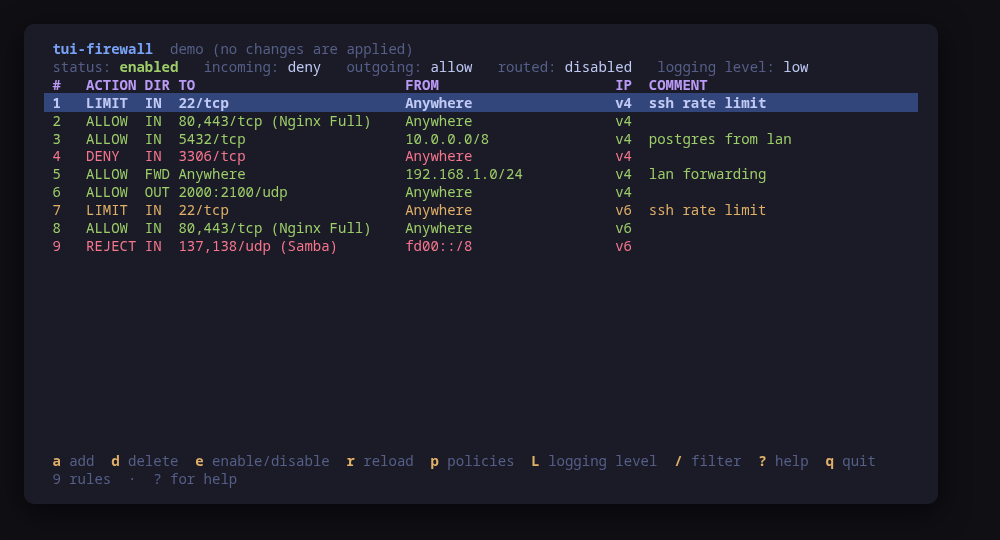
The rules table, with status, default policies and logging in the header
A terminal UI for the Linux firewall, driving ufw and firewalld. It shows the rules you actually have — action, ports, source, destination, services, rich rules, IPv6 and forwarding included — alongside the default policies or zone targets and the logging level.
The UI never builds a command line. It talks to a backend behind an interface, which returns a firewall-neutral model and produces command values; the confirm dialog shows those values and hands the same ones to the runner, so what you read is what executes. On firewalld that means both lines: the change to the running firewall and the same change made permanent, with no reload and no dropped connections.
Run tui-firewall --demo for an in-memory ufw, or tui-firewall --demo=firewalld for an in-memory firewalld: every key works, every command is built and previewed for real, and nothing touches your system.
Keys
Key
Action
a
Add a rule
d
Delete the selected rule
e
Enable or disable the firewall (ufw)
p
Change a default policy, or a firewalld zone target
L
Change the logging level, or the firewalld log-denied value
r
Reload the firewall
x
Actions this backend offers beyond these keys
/
Filter rules across every column
[ / ]
Previous / next group: the firewalld zones and policies
R
Re-read the firewall
?
Help
q
Quit
Press ? inside the tool for the full help screen, which is generated from the same action table as the key map.
Compatibility
This tool is a face on the program below, so its version matters.Tested is not a claim: a version lands there only after the tool's own suite passed against it on a real machine in the lab, and the run is kept as evidence in the repository. At startup the tool probes the backend once and says what it found in its header — a version nobody has run against is shown as(untested) in the warning colour, one older than the minimum as (below minimum) in the error colour. Neither stops it: the backend still refuses what it cannot do, in its own words.
ufw
ufw ≥ 0.36
Binary
ufw
Minimum
0.36
Probed with
ufw --version
Tested
0.36.2
Needs a version this new
rule-commentssince 0.35
What changes on older versions
ufw <0.36
ufw status numbered has no app profile column, so a rule added from a profile is shown by its ports and cannot be edited as a profile
ufw 0.36.x
status numbered indexes IPv4 and IPv6 halves of one rule separately, so deleting by number renumbers the rest and the list is re-read after every delete
firewalld
firewall-cmd ≥ 0.9
Binary
firewall-cmd
Minimum
0.9
Probed with
firewall-cmd --version
Tested
2.4.4
What changes on older versions
firewalld ==2.0.0
--permanent --list-all-zones prints the same settings for every zone on this release (firewalld#1152), so the permanent half of the runtime/permanent comparison is not trustworthy; 2.0.1 fixed it
firewalld >=2.2
firewalld removed the lockdown feature, so no lockdown state is shown
Install
Once per machine, then every tool in the family is one pacman away.
Add the repository
$ curl -fsSL https://pkgs.tui.tools/install.sh | sh
Or run the same thing yourself, one command at a time
A family whose whole promise is preview before you run is not going to insist you pipe a script into a shell. These are the commands that script runs.
Upgrades then arrive with the rest of your system updates.
!
Not published yet. The command is what it will be once the package repository at pkgs.tui.tools is live. Until then, use the static binary or build from source.
Arch Linux (AUR) · tui-firewall-bincoming soon
$ paru -S tui-firewall-bin
The -bin package installs the released static binary.
Once per machine, then every tool in the family is one apt away.
Add the repository
$ curl -fsSL https://pkgs.tui.tools/install.sh | sh
Or run the same thing yourself, one command at a time
A family whose whole promise is preview before you run is not going to insist you pipe a script into a shell. These are the commands that script runs.
Upgrades then arrive with the rest of your system updates.
!
Not published yet. The command is what it will be once the package repository at pkgs.tui.tools is live. Until then, use the static binary or build from source.
Needs the tui-tools repository, a one-time setup you do once per machine.
openSUSE · tui-firewallcoming soon
$ sudo zypper install tui-firewall
The rpm repository is shared with dnf; zypper support is not tested yet.
One static binary. Verify it against checksums.txt from the same release.
From source · tui-firewall
$ git clone https://github.com/tui-tools/tui-firewall
  cd tui-firewall && make build
  sudo install -m0755 bin/tui-firewall /usr/local/bin/tui-firewall
Needs Go 1.26 or newer.
What it can do to your machine
✓
Preview, then confirm
Every change is shown as an exact command line and confirmed before it runs. The dialog and the runner receive the same value, so the preview cannot drift from what executes.
•
Escalates for actions
Reading the firewall and every change need root: ufw status and its add/delete/enable/reload/policy/logging, and every firewall-cmd read and write. Escalation goes through sudo -n, which never prompts; --sudo "" runs the command directly when you are already root.
✓
No daemon, no state of its own
Nothing keeps running after you quit, and nothing is installed to run later. The system is the source of truth; the tool re-reads it after every change.
✓
No network access
The tool opens no network connection of its own. No telemetry, no update check, no phone home.
✓
Static binary
Released statically linked, with no runtime dependencies to install.
✕
Releases are not signed yet
Releases carry SHA-256 checksums but no signature. Verify the checksum, and read this as the open item it is.
Reporting
Report a security issue privately, through GitHub's private vulnerability reporting on the repository's Security tab. The family-wide policy, and what counts as in scope, is on the security page.
## Changelog
* 207f07781735090534fcfefc2ed7a06a9066fe9d Add --check, a non-interactive read path, and a backend smoke test
* 2f750800d0ddd6aaa7f030f90b7ab94ade7d3424 Add tool.json and generate the README Install section from it
* c48b5087567f49c363aa218b8a0d5056bdef163d Assert real firewalld behaviour in the lab, not a stub
* fe0eab2a5a1e383c75a02412264451bd5b6ffc29 Bump the github-actions group with 5 updates (#1)
* a041d686c727f2131875c495967d02f958b87450 Document firewalld, and screenshot it
* 8a08d6e8a0edd23c19ecd39b52b58e9e2b5554da Drive firewalld for real, behind the same backend interface
* a2f36e0bf3049795539f3f94446d8bd69c1d38cc Hold both ends of the tested firewalld range
* 745e37130fab6b1576310b1974afe09797da5827 Hold this tool to the family's lint bar
* 2e081b07e7a2d078eae6952e4078b3b007460f0b Keep the sudo note inside the manifest's length limit
* 2fa4c9aa63b2b9d28510117c5d04c54d7fc3a72c Re-pin the kit at v0.1.3 for the help panel width fix
* e46dccea33b8b8e70eb22637c0a6771dcfb9b3d2 Re-pin the kit at v0.2.3
* 615bf4454c3fbd7d807acaa2de0c6e7823ac6ab3 Separate deciding which firewall to drive from reaching for it
* 34abbdb3baf3d43283c99461ec10c6b7d44ab6f4 Show which ufw version is being driven
* 7ed706447b61f79992a17fdcc95648be2c53e7cf Test the firewalld backend against captured firewall-cmd output
## Changelog
* fba69433282c466da095ed7bca42e77b0909815b Add fwall v0.1, a TUI for the system firewall
* 806e85f02d850aa1dbc6dd1378fafb3a5ceed9ab Add the backend-agnostic firewall model and backend selection
* 0ea1fda195d90c82547712bd856ed6cbe4f0865f Become tui-firewall, a repository of its own
* 71847bc95a88cbde146e0a86e93217ac6d8c6b2c Depend on tui-kit v0.1.1 for the table layout fix
* 3e7ee4cae39f30c171f635216e5619f37bae0271 Implement the ufw backend with parsers and a fake
* f10888e19b97ab5a1846b58c29830a60376c3173 README: unofficial, under-validation disclaimer
* 1abc40bbe47f9823d6bfcf5c0c15cf4c5bbe1625 Scaffold the tui-tools monorepo