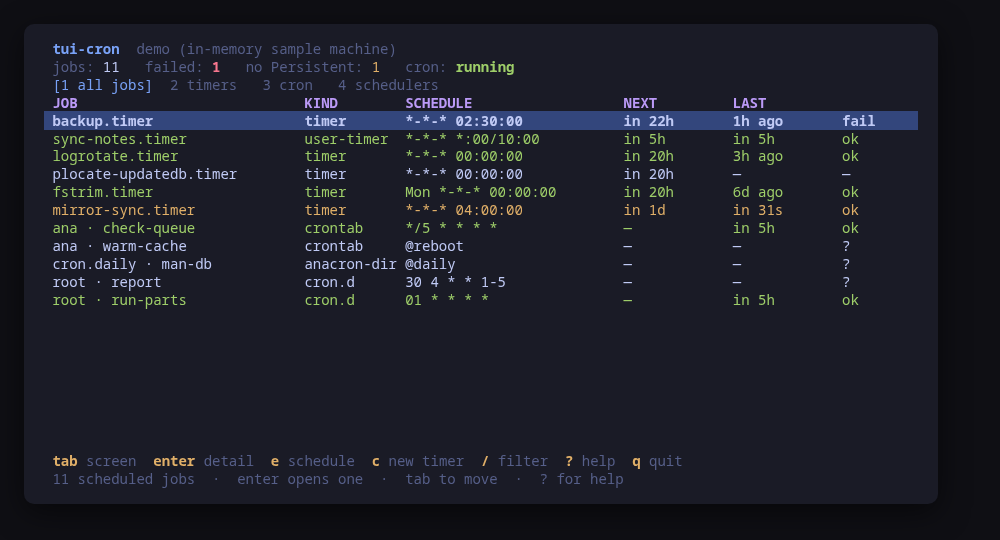
Every scheduled job on one screen, systemd timers and cron together
v0.1.1schedulingMIT
Every scheduled job on one list: systemd timers and cron together, with the schedule as written and how the last run went
A terminal UI for everything scheduled on a machine. systemd timers and cron are two schedulers with two syntaxes, two sets of commands and two ways of reporting what happened; tui-cron puts them on one list — the name, the schedule as written, the next run, the last run and how it went.
Next to every expression is what it means, in English. 17 3 * * 1 and *-*-01..07 12:00:00 are both precise and neither is readable, and the mistakes people make with them are mistakes of reading. The reading is generated by the tool's own describer for cron and for OnCalendar, and the detail screen adds the next five runs as systemd-analyze calendar computes them.
Changes are previewed. A timer's schedule goes to a drop-in — the unit file is never rewritten — checked with systemd-analyze calendar first. A crontab is replaced through crontab <file>, cron's own interface, with the diff on screen. A cron line can be converted into a timer, written but deliberately not enabled.
Run tui-cron --demo to drive a sample machine: every key works, every command is built and previewed for real, and nothing touches your system.
Keys
Key
Action
tab / 1-4
Move between all jobs, timers, cron and the schedulers themselves
enter
Open the selected job: its unit or table, the next runs, and its log
e
Change when the selected job runs, with a diff to confirm
a
Add a line to your own crontab
d
Remove the selected cron line
c
Create a systemd timer and the service it runs
t
Write a timer for the selected cron line, not enabled
E / D
Enable or disable the selected timer at boot
n
Run the selected job now, off its schedule
/
Filter the rows of the current screen
?
Help
q
Quit
Press ? inside the tool for the full help screen, which is generated from the same action table as the key map.
Compatibility
This tool is a face on the program below, so its version matters.Tested is not a claim: a version lands there only after the tool's own suite passed against it on a real machine in the lab, and the run is kept as evidence in the repository. At startup the tool probes the backend once and says what it found in its header — a version nobody has run against is shown as(untested) in the warning colour, one older than the minimum as (below minimum) in the error colour. Neither stops it: the backend still refuses what it cannot do, in its own words.
systemd
systemctl ≥ 245
Binary
systemctl
Minimum
245
Probed with
systemctl --version
Tested
255259261
Needs a version this new
timers-jsonsince 250
What changes on older versions
systemd <250
systemctl list-timers --output=json does not exist, so the timers are enumerated from systemctl list-units --type=timer instead; nothing is lost, because every column shown is read from systemctl show either way
systemd >=245
systemd-analyze calendar --iterations is what computes the next runs and validates a new OnCalendar. It arrived in 242, below this minimum, so it is not gated: on every version this tool supports it is simply there
systemd >=245
a timer in your own manager is read through systemctl --user, which needs a user bus; over a serial console or a bare sudo -i shell there is none, and the tool says the user timers were not read rather than that there are none
cron
Binary
crontab
Tested
No recorded run yet. The tool still runs and reports the version it found as untested.
What changes on older versions
cron >=1
cron declares no version command. cronie answers crontab -V with "cronie 1.7.2"; Debian's vixie cron has no such flag and no sibling program that prints one, so a version would appear on Fedora and be blank on Ubuntu. The header shows cron without a number
cron >=1
there is no portable way to have cron check a table: cronie ships crontab -T, Debian's cron ships nothing equivalent. A line is therefore parsed by this tool before it is written, with the same check on every machine
cron >=1
cron records that a command started, and cronie also that it returned; neither records an exit status anywhere. A cron job's last result is therefore "it ran" at best, and the screen says so rather than implying it worked
cron >=1
a machine may have no cron at all — Omarchy Server is one — and that is a normal machine, not a failure: the timers are listed, and cron reports itself as absent with the reason
cron >=1
a machine with no cron may still carry run-parts scripts: Omarchy Server ships /etc/cron.hourly/snapper and nothing that walks the directory. They are listed anyway, and each row says nothing runs it rather than showing a file that looks scheduled as active
Install
Once per machine, then every tool in the family is one pacman away.
Add the repository
$ curl -fsSL https://pkgs.tui.tools/install.sh | sh
Or run the same thing yourself, one command at a time
A family whose whole promise is preview before you run is not going to insist you pipe a script into a shell. These are the commands that script runs.
Upgrades then arrive with the rest of your system updates.
!
Not published yet. The command is what it will be once the package repository at pkgs.tui.tools is live. Until then, use the static binary or build from source.
Arch Linux (AUR) · tui-cron-bincoming soon
$ paru -S tui-cron-bin
The -bin package installs the released static binary.
Once per machine, then every tool in the family is one apt away.
Add the repository
$ curl -fsSL https://pkgs.tui.tools/install.sh | sh
Or run the same thing yourself, one command at a time
A family whose whole promise is preview before you run is not going to insist you pipe a script into a shell. These are the commands that script runs.
Upgrades then arrive with the rest of your system updates.
!
Not published yet. The command is what it will be once the package repository at pkgs.tui.tools is live. Until then, use the static binary or build from source.
Needs the tui-tools repository, a one-time setup you do once per machine.
openSUSE · tui-croncoming soon
$ sudo zypper install tui-cron
The rpm repository is shared with dnf; zypper support is not tested yet.
One static binary. Verify it against checksums.txt from the same release.
From source · tui-cron
$ git clone https://github.com/tui-tools/tui-cron
  cd tui-cron && make build
  sudo install -m0755 bin/tui-cron /usr/local/bin/tui-cron
Needs Go 1.27 or newer.
What it can do to your machine
✓
Preview, then confirm
Every change is shown as an exact command line and confirmed before it runs. The dialog and the runner receive the same value, so the preview cannot drift from what executes.
•
Escalates for actions
Reading needs nothing: systemctl show, crontab -l for your own table and the journal all answer to any user. Every change escalates through sudo -n, which never prompts — installing a drop-in, replacing a crontab, enabling a timer or running one now.
✓
No daemon, no state of its own
Nothing keeps running after you quit, and nothing is installed to run later. The system is the source of truth; the tool re-reads it after every change.
✓
No network access
The tool opens no network connection of its own. No telemetry, no update check, no phone home.
✓
Static binary
Released statically linked, with no runtime dependencies to install.
✕
Releases are not signed yet
Releases carry SHA-256 checksums but no signature. Verify the checksum, and read this as the open item it is.
Reporting
Report a security issue privately, through GitHub's private vulnerability reporting on the repository's Security tab. The family-wide policy, and what counts as in scope, is on the security page.
## Changelog
* 8f8d260c65d36b17df15a571ed686a9dfbb664df Add the kind counts up without bc, which two of three guests do not have
* 9bce42a82b4c661f6bd0b139bf072a8df3487681 Fit the run-parts note inside the manifest's 300-character impact limit
* 3f78a3d4dda18f12bcc9e48dbbf2a83d85c68c48 List run-parts scripts on a machine that has no cron
* ec9c7c62fb69ed104578382d247987e16dd5cda4 Packages are available from pkgs.tui.tools
* 954a57ceb98e76dd0e51f631e9a51fd76f097b2c Re-pin the kit at v0.2.3
* 35d6986e2939d5178f295451c0a9920094c2b12e Ship the tool as a .deb, an .rpm and a pacman package
## Changelog
* d2fe6a7b4daa05010b09d237b5774c1ce5b42c26 Build tui-cron: every scheduled job on one screen, in English
* 4d5768e7384a701e5d82d041dfe1bddf54862297 Initial commit